
In our previous blog posts (https://dynfotech.com/category/saf-t/), we discussed the necessary configurations required for generating SAF-T files in both Norwegian and Danish legal entities. Despite setting up these configurations correctly, users may encounter error messages during the file generation process. In this post, we’ll explore some potential solutions for when a SAF-T file fails to generate.
Error Message:
Sometimes, users may encounter the following error message even after providing all the required parameters (date, consolidation account group, header comment, tax accounting basis, and tax entity) for generating the SAF-T(DK) report:

Cannot find ‘DisplayValue’ field in ‘DimensionAttributeLevelValueView’ table
Error while evaluating expression for path ‘$AttributeValueView/DisplayValue’.
Error while evaluating expression for path ‘AnalysisID’.
Evaluating binding of format component Folder/File/AuditFile/SourceDocuments/SalesInvoices/Invoice/Line/Analysis/AnalysisID/String.

Resolution:
To resolve the issue, follow these steps:
- Ensure that your product version is 10.0.38 or newer.
- Import the latest configuration from Microsoft Dataverse for:
- SAF-T Format (DK)
- SAF-T General model mapping
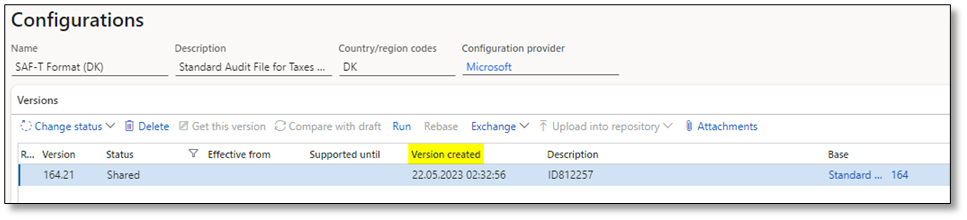

- Add mapping table for “SAF-T Format (DK)” Standard Tax Code and set the state to “Completed.”
- Activate “Default for model mapping” for SAF-T General model mapping.

- Disable the feature: “Minimize memory consumption by storing datasets at ER reports runtime” in Feature management workspace.

- Run the process to rebuild table references (Organization administration > Electronic reporting > Rebuild table references)

After completing these steps, attempt to generate the report again to see if the issue is resolved. If the error persists, we recommend creating a support case with Microsoft for further assistance. This resolution is based on insights shared by contributors in the SAF-T yammer group.
We hope this post provides valuable insights into troubleshooting SAF-T file generation errors. If you have any questions or feedback, please feel free to leave a comment below. Your input is highly appreciated!
 DynFOTech