
In our previous blog posts, we discussed the necessary configurations for generating SAF-T files in both Norwegian and Danish legal entities and how to troubleshoot potential error messages during file generation. In this post, we’ll explore the validation checks defined in SAF-T to ensure successful validation by the tax administration’s tool.
The following validations are designed for electronic reporting in SAF-T file generation:
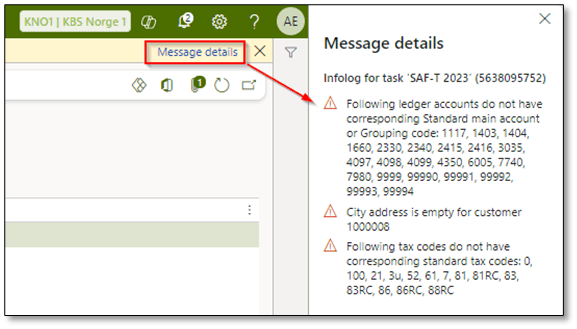
- Address: Checks are performed for the city and zip code in the primary address of customers, vendors, and the legal entity.
Action: Warning + Continue execution (write a remark to user info log)


- Registration number: Checks for the legal entity or company registration number.
Action: Warning + Continue execution (write a remark to user info log)


- Mapping: Checks for tax code and main account mapping. Ensure that you have set up mappings for all tax codes and main accounts to the standard ones and select “NA” for those that do not apply.
Action: Error message + Continue execution (write a remark to user info log)


- Contact person: Checks for a company contact person assigned during the SAF-T report generation.
Action: Warning + Continue execution (write a remark to user info log)


For mandatory elements in the SAF-T file that lack specific values, a default value of “NA” is used. For instance, if the company name or country address is not available, “NA” will be used.

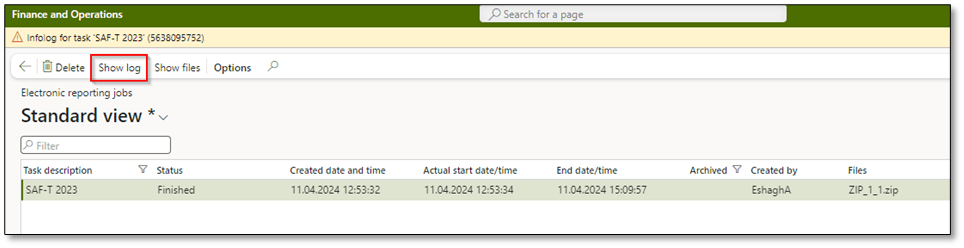
Once you have generated a SAF-T file, you can review electronic reporting jobs by navigating to Organizations administration > Electronic reporting > Electronic reporting jobs and clicking on “Show log” to get a better overview of fields that need to be reviewed and potentially updated to generate a valid file for the tax administration.
I hope this post provides valuable insights into troubleshooting SAF-T file generation and the advantages of validation controls in SAF-T configuration. If you have any questions or feedback, please leave a comment below. Your input is highly appreciated!
 DynFOTech