
Electronic invoicing (e-Invoicing) is transforming how businesses exchange invoice data globally. It enables seamless, structured, and automated transmission of invoice documents between trading partners, reducing manual effort and ensuring compliance with local tax regulations.
This blog post aims to give you a complete overview of:
- What an electronic invoice is
- What an Access Point is and how it works
- How e-Invoicing supports B2G, B2B, and B2C processes
- How to generate and automate the sending of e-Invoices in D365FO
- How to leverage the Electronic Invoicing Add-on
- Which countries are currently supported
What is an Electronic Invoice?
An electronic invoice (e-Invoice) is an invoice that is issued, transmitted, and received in a structured data format—typically XML—that allows for automatic and electronic processing by both sender and receiver systems.
Reference: Directive 2014/55/EU.
e-Invoicing is often mandated by governments to ensure tax transparency and prevent fraud. It is already compulsory in many countries (e.g., Norway, Sweden, Denmark, Mexico, Brazil) and the EU aims to make it the default method for invoicing across member states.
D365FO supports e-Invoicing for the following document types:
- Sales invoices and credit notes
- Project invoices and credit notes
- Collection letters
What is an Access Point?
An Access Point (AP) is a certified service provider that allows businesses to connect to the Peppol network, which facilitates cross-border e-Invoicing across the EU and other regions. The AP handles:
- Registration of participants (sender/receiver)
- Validation and compliance checks of electronic documents
- Secure delivery of e-Invoices to the recipient
Using an Access Point removes the need for individual integrations between companies, enabling a true plug-and-play model.
More information: https://www.logiqconnect.com/
Use Cases: B2G, B2B, and B2C
Electronic invoicing supports a wide range of business scenarios across public and private sectors. These include:
Business-to-Government (B2G)
Many countries have made e-Invoicing mandatory for suppliers working with public sector entities.
- Invoices must follow specific structured formats (like PEPPOL BIS Billing 3.0 or country-specific schemas).
- Governments often maintain directories or registries to route e-Invoices securely through approved networks (e.g., PEPPOL).
- Ensures compliance, transparency, and faster processing of invoices.
👉 In Norway, it is mandatory to use the EHF Billing 3.0 format (based on PEPPOL BIS) for all B2G invoices, and all public sector organizations are registered in ELMA (Norway’s PEPPOL SMP directory).
Business-to-Business (B2B)
E-Invoicing adoption is growing among private companies seeking to automate their Accounts Payable and Accounts Receivable processes.
- Reduces manual data entry and processing time.
- Minimizes errors and disputes.
- Facilitates faster payment cycles and improved cash flow.
- Promotes interoperability between suppliers and buyers via standardized formats.
👉 In Norway, many private companies voluntarily register in ELMA to exchange invoices electronically over the PEPPOL network, enabling full automation of invoice exchange with their business partners.
Business-to-Consumer (B2C)
Although still evolving, B2C e-Invoicing is gaining traction, especially in sectors like e-commerce, utilities, and telecom.
- Digital invoice delivery enhances the customer experience.
- Helps organizations reduce postal costs and payment delays.
- Often integrated with consumer portals, banks, or digital mailboxes.
👉 In Norway, some Access Points offer hybrid delivery for B2C scenarios—if a consumer is not eligible to receive a PEPPOL e-Invoice, the Access Point can automatically convert and deliver the invoice via email or traditional post.
Generating e-Invoice Files in D365FO
You can generate e-Invoice XML files using Electronic Reporting (ER) by:
- Importing country-specific ER configurations from Microsoft’s repository
- Setting up customers and legal entities
- Configuring document types (e.g., Sales Invoice) to use ER formats
See a detailed example for Norway using PEPPOL BIS Billing 3.0 in this DynFOTech blog series.
Part 1: Introduction
- Overview of generating e-invoices in D365FO using PEPPOL BIS Billing 3.0 (EHF Billing 3.0).
- Process of sending the generated e-invoice file to an access point via SFTP.
- Introduction to relevant resources and validation tools.
🔗 Read Part 1
Part 2: Configuration
- Steps to configure electronic reporting parameters in D365FO.
- Importing necessary configurations for e-invoice formats.
- Setting up the system to comply with PEPPOL BIS Billing 3.0/EHF Billing 3.0 specifications.
🔗 Read Part 2
Part 3: Company Setup
- Configuring Norwegian legal entities in D365FO for e-invoicing.
- Adding necessary configurations and unit codes.
- Ensuring company data aligns with e-invoicing requirements.
🔗 Read Part 3
Part 4: Customer and Project Funding Sources Setup
- Activating customers for e-invoicing in D365FO.
- Configuring project funding sources associated with project contracts.
- Ensuring customer and project data meet e-invoicing standards.
🔗 Read Part 4
Part 5: Invoice Setup
- Setting up invoices (free text, sales, project) for e-invoicing.
- Ensuring invoices contain all required information before posting.
- Aligning invoice data with PEPPOL BIS Billing 3.0/EHF Billing 3.0 specifications.
🔗 Read Part 5
Part 6: Sending E-Invoice and Validation
- Generating e-invoice files via electronic reporting.
- Validating e-invoice files using the VEFA validator.
- Sending validated e-invoice files to access points.
- Handling attachments and ensuring compliance with supported formats.
🔗 Read Part 6
Dynamics 365 Finance provides a robust and configurable framework to generate compliant electronic invoices via the Globalization Studio. These services utilize the global repository and templates aligned with PEPPOL BIS standards.
Below is a simplified overview of how e-Invoice files are prepared and validated before being sent through the PEPPOL network:
The process ensures that:
- The e-invoice file generated in D365FO is compliant with the local regulatory schema.
- Documents are validated against PEPPOL BIS standards.
- The recipient’s capability is confirmed through SMP and SML registry lookups.
- Only valid and supported documents are exchanged across the PEPPOL network.
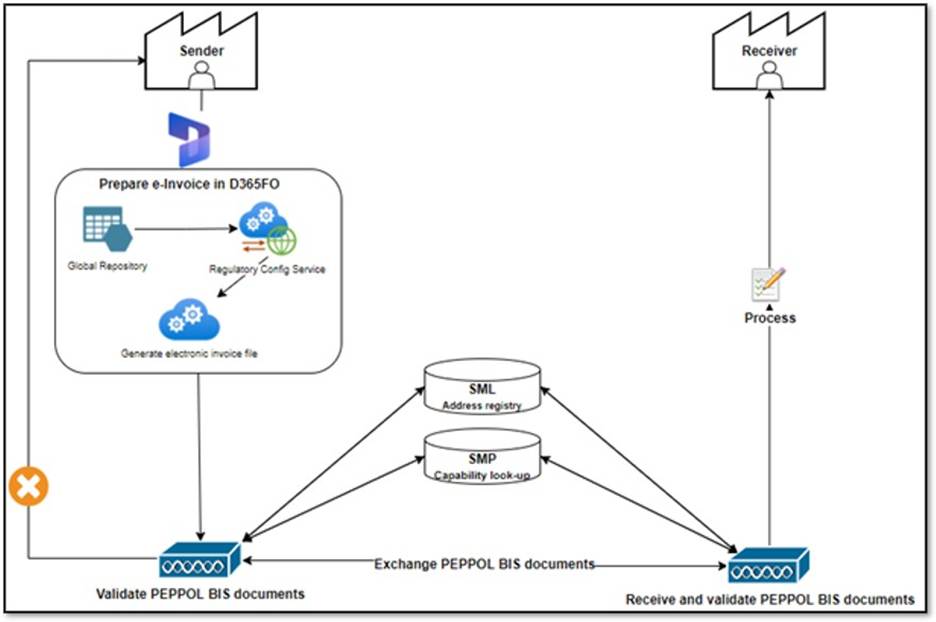
🔴 Note: SMP is known as ELMA in Norway.
Automating e-Invoice Delivery to Access Point
The core challenge is automating the transmission of the e-Invoice file to the Access Point (via SFTP or API). Below are some practical solutions:
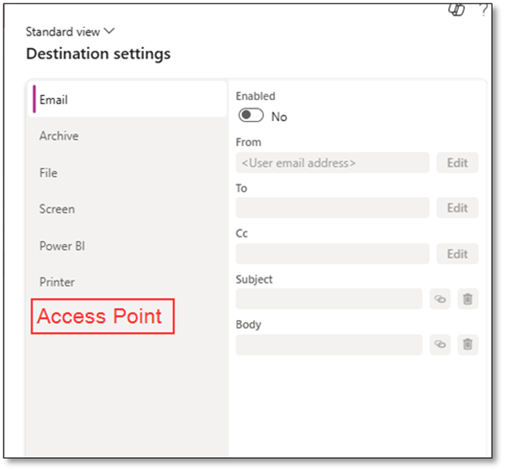
1. Customize ER Destination with Access Point Support
Extend the Electronic Reporting destination settings to include Access Point endpoints. This requires development but allows direct delivery upon report generation.
🔗 Related links:
- Specify custom storage for ER documents
- Configure action-dependent ER destinations
- Implement custom destination
2. Use SharePoint + Logic Apps
Configure ER to store files in SharePoint, then trigger an Azure Logic App to send the file to the Access Point via SFTP or API.
🔗 Resources:
3. Use Power Automate
Similar to Logic Apps, Power Automate can move files from SharePoint or another location to your Access Point service.
🔗 Power Automate connectors for Fin & Ops
4. Custom Integration Layer
Build a dedicated custom integration from D365FO to the Access Point using:
- Batch jobs
- Azure Key Vault (for SFTP credentials)
- Custom tracking forms for transmission logs
This approach offers full control and traceability.
Leveraging the Electronic Invoicing Add-On
Microsoft offers an Electronic Invoicing Add-on for D365FO, SCM, and Project Operations, which simplifies configuration and enables cloud-native delivery of e-Invoices. It supports:
- Document transformation
- Validation
- Routing to national platforms and Access Points
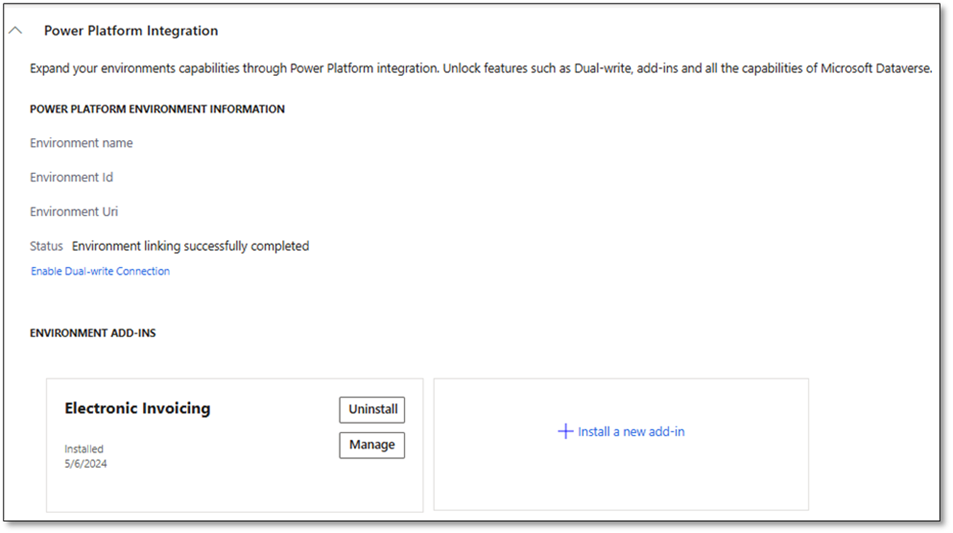
🔴 Note: The Electronic Invoicing Add-on is not available for on-premises deployments.
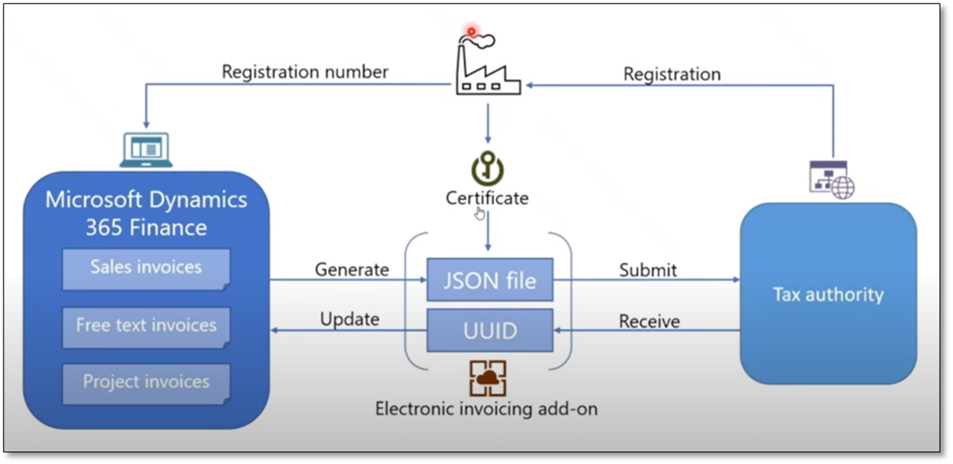
Below is an illustration of how the process works with the add-on in a direct-to-tax-authority scenario:
As shown above, the system:
- Generates a JSON file based on invoice data.
- Submits it via the Electronic Invoicing add-on with a UUID and certificate.
- Interacts with the tax authority for validation and acknowledgment.
This end-to-end flow ensures compliance with regulatory requirements while minimizing manual steps.
Supported Countries (as of 2025 planning):
| Country | Format(s) | Availability |
|---|---|---|
| Argentina | XML via WebServices to AFIP | Planned for 2025 release wave 1 |
| Australia | PEPPOL (Australian extension) | Available |
| Austria | PEPPOL | Available |
| Belgium | PEPPOL | Available |
| Bolivia | XML format | Planned for 2025 release wave 1 |
| Brazil | NF-e and NFS-e | Available |
| Chile | DTE (country-specific format) | Available |
| China | Fapiao via Golden Tax System | Available |
| Colombia | UBL V2.1 adopted by DIAN | Planned for 2025 release wave 1 |
| Costa Rica | Country-specific format | Available |
| Denmark | OIOUBL and PEPPOL | Available |
| Dominican Republic | XML format based on UBL standard | Planned for 2025 release wave 2 |
| Ecuador | XML format complying with SRI requirements | Planned for 2025 release wave 2 |
| Egypt | Country-specific format | Available |
| Estonia | Country-specific format | Available |
| Finland | Finvoice | Available |
| France | PEPPOL | Available |
| Germany | xRechnung | Available |
| Italy | FatturaPA (SDI) | Available |
| Malaysia | Country-specific format | Available |
| Mexico | CFDI | Available |
| Netherlands | UBL-OHNL | Available |
| New Zealand | PEPPOL | Available |
| Norway | PEPPOL | Available |
| Panama | Country-specific format | Available |
| Paraguay | XML format | Planned for 2024 release wave 2 |
| Peru | UBL V2.1 adopted by SUNAT (CPE) | Planned for 2025 release wave 2 |
| Poland | Country-specific format | Public preview: GA planned for 2025 wave 1 |
| Saudi Arabia | Country-specific format | Available |
🔗 Learn more:
Future Outlook
Microsoft continues to expand support for Access Point integrations within the Electronic Invoicing Add-on. For example:
- Edicom is now available as a last-mile provider in Belgium.
- Microsoft is working on universal connectors to simplify connectivity.
🔗 Use extensible universal connector for E-Invoicing service
Microsoft is continuously enhancing the Electronic Invoicing Add-on to offer more seamless integration with networks like PEPPOL, leveraging “last-mile connectors” and secure cloud-native services.
Below is an overview of the emerging architecture:
This architecture represents a scalable and secure future:
- Standardized formats.
- Secure key management via Azure Key Vault.
- Direct integration with PEPPOL through certified connectors.
- Enhanced support for vendor invoices and country-specific configurations.
With these developments, Microsoft is paving the way toward a truly automated, compliant, and global e-invoicing strategy.
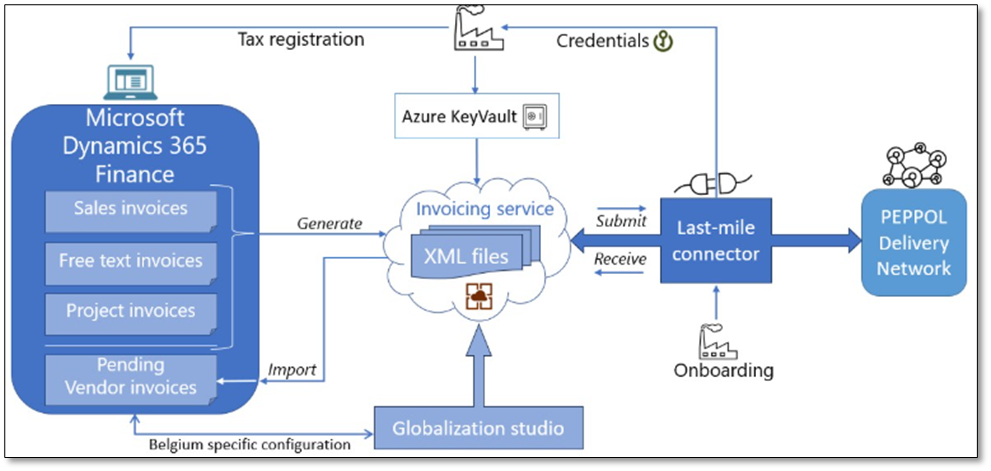
Reference: e-Invoice with last-mile connector
Summary
Electronic invoicing is becoming a global standard. With D365FO, you can:
- Generate structured XML invoice files
- Automate delivery to Access Points
- Comply with local e-Invoice mandates
- Scale B2G, B2B, and B2C integrations
Whether using standard ER or the Electronic Invoicing Add-on, the platform is flexible enough to meet regulatory needs and streamline your invoicing process.
Thanks for reading! Got questions or tips? Feel free to drop them in the comments!
 DynFOTech
2 Comments Add yours